Managing web hosting infrastructure efficiently is becoming increasingly important for hosting providers and system administrators. At the same time, reducing resource consumption and licensing costs is now a key priority.
For this reason, many professionals look for alternatives to expensive hosting control panels. Whether you want to improve server performance, lower operational costs, or manage reseller hosting more efficiently, choosing the right control panel matters.
DirectAdmin stands out as a cost-effective and lightweight solution. In particular, it offers essential hosting management features without the heavy resource usage commonly found in competing platforms.
In this complete guide, you’ll learn what DirectAdmin is, how it works, and why it’s popular among budget-conscious hosting providers. Additionally, we’ll cover its key features, licensing options, performance advantages, and a clear comparison with cPanel and other alternatives.
What is DirectAdmin?
DirectAdmin is a commercial web hosting control panel developed by JBMC Software that has been serving the hosting industry since 2003. Known for its efficiency, simplicity, and affordable pricing, DirectAdmin powers hundreds of thousands of servers worldwide, particularly among hosting resellers and budget-conscious providers.
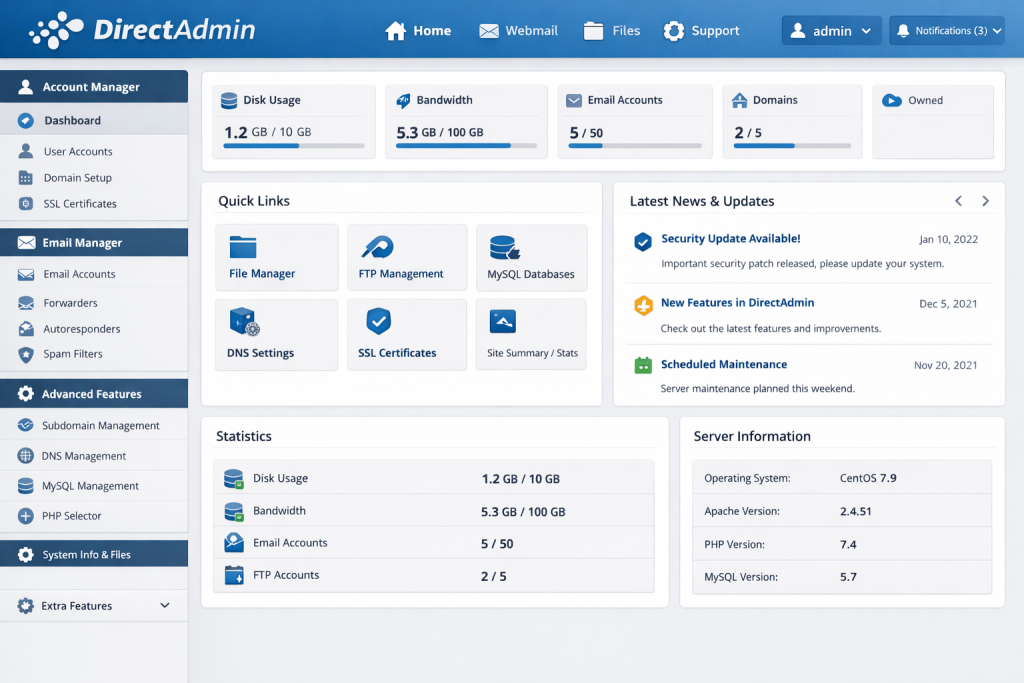
The platform distinguishes itself through several key characteristics:
- Minimal resource footprint – Uses significantly less RAM and CPU compared to alternatives
- Simple licensing model – Predictable costs without complicated tier structures
- Fast performance – Lightweight codebase results in quick interface response times
- Three-tier architecture – Separate interfaces for administrators, resellers, and end users
Unlike resource-intensive alternatives, DirectAdmin can run efficiently on servers with as little as 1GB RAM, making it ideal for VPS environments and cost-optimization scenarios.
How DirectAdmin Works
DirectAdmin operates as a web-based control panel that manages Linux server configurations through an intuitive interface. The platform consists of three distinct access levels:
- Admin Level – Full server management, reseller creation, and system configuration
- Reseller Level – Create and manage user accounts, set resource limits, and handle billing
- User Level – End-user interface for website, email, and database management
Access DirectAdmin through your web browser using:
https://yourdomain.com:2222
https://yourserverip:2222
Key Features of DirectAdmin
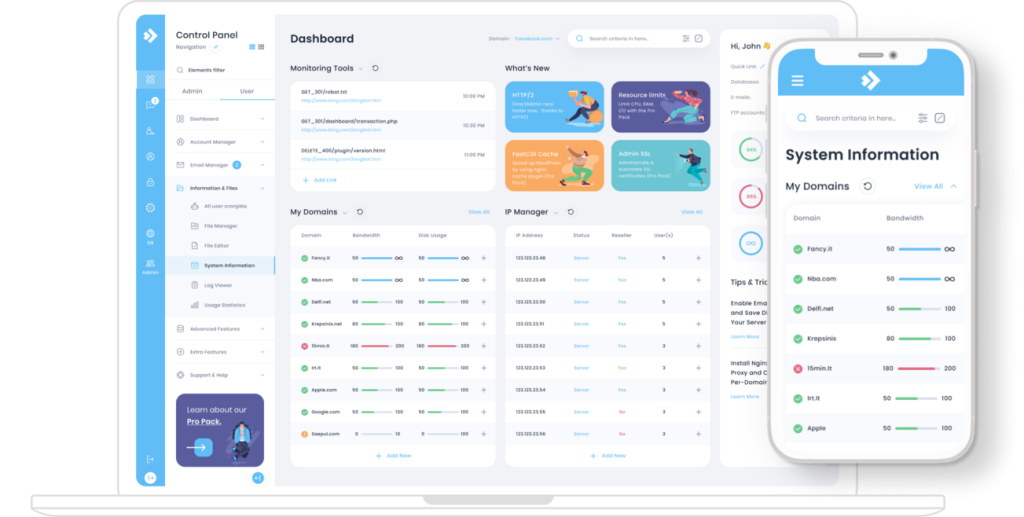
DirectAdmin provides comprehensive hosting management capabilities while maintaining its lightweight philosophy.
1. Server Administration
- Service Management – Control Apache, nginx, PHP, MySQL, and other services
- DNS Management – Create and modify DNS zones with support for custom records
- IP Address Management – Allocate dedicated IPs to accounts and configure shared hosting
- System Info & Statistics – Monitor server resources, load averages, and disk usage
- Software Updates – Built-in update system for DirectAdmin and server software
2. Reseller Management
- Reseller Account Creation – Set up hosting resellers with custom resource allocations
- Package Management – Define hosting packages with specific limits and features
- White-Label Capability – Customize branding and interface for reseller clients
- Resource Monitoring – Track bandwidth, disk space, and account usage per reseller
3. Website Management
- Domain Management – Add domains, subdomains, and domain aliases
- File Manager – Web-based file browser with upload, download, and edit capabilities
- FTP Accounts – Create unlimited FTP users with directory-specific access
- PHP Version Selection – Switch between multiple PHP versions per domain
- SSL/TLS Certificates – Install Let’s Encrypt certificates with automatic renewal
4. Email Services
- Email Accounts – Unlimited email addresses with POP3/IMAP/SMTP access
- Webmail Interfaces – RoundCube webmail included by default
- Email Forwarders – Configure email forwarding and catch-all addresses
- Spam Protection – SpamAssassin integration with customizable filtering rules
- Mailing Lists – Majordomo support for email distribution lists
5. Database Management
- MySQL/MariaDB – Create and manage databases with phpMyAdmin
- PostgreSQL Support – Optional PostgreSQL with phpPgAdmin (requires plugin)
- Remote Database Access – Configure external connections for applications
- Database Backups – Automated database backup capabilities
6. Backup System
- Automated Backups – Schedule regular account backups
- User-Initiated Backups – Allow users to create on-demand backups
- Backup Restoration – Restore complete accounts or individual components
- Remote Backup Storage – Configure FTP-based offsite backup storage
7. Application Installation
- Softaculous – Optional premium installer for 400+ applications including WordPress
- Installatron – Alternative application installer available as plugin
- Manual Installation – Direct file upload and database configuration
DirectAdmin Pricing and Licensing
DirectAdmin’s straightforward pricing model makes it attractive for budget-conscious hosting operations.
License Types and Costs
| License Type | Monthly Price | Lifetime Price | Best For |
|---|---|---|---|
| Personal | $5/month | $99 one-time | Single user, 1 domain |
| Lite | $15/month | $199 one-time | 10 users maximum |
| Standard | $29/month | $299 one-time | Unlimited users |
| Datacenter | Custom pricing | Volume discounts | Multiple servers |
Additional Costs
Beyond the DirectAdmin license, consider these optional expenses:
- Softaculous – $1.50-2/month for application installation functionality
- Imunify360 – $10-15/month for advanced security features
- CloudLinux OS – $10-15/month for enhanced stability and resource management
- LiteSpeed Web Server – $10-45/month for improved PHP performance
Even with these additions, total costs typically remain lower than competing control panels.
Performance Advantages
DirectAdmin’s lightweight architecture delivers measurable performance benefits that become especially important in resource-constrained environments.
Resource Usage Comparison
| Control Panel | RAM Usage (Idle) | Minimum RAM | Interface Speed |
|---|---|---|---|
| DirectAdmin | ~100-200 MB | 1 GB | Very Fast |
| cPanel | ~500-800 MB | 2 GB | Moderate |
| Plesk | ~400-600 MB | 2 GB | Moderate |
Why DirectAdmin is Faster
- Compiled C Code – Core components written in C rather than interpreted languages
- Minimal Dependencies – Fewer background services and processes
- Efficient Database Queries – Optimized database usage for faster page loads
- Simplified Interface – Less JavaScript and fewer HTTP requests
These optimizations make DirectAdmin particularly suitable for:
- Budget VPS instances with limited RAM
- High-density shared hosting environments
- Servers hosting hundreds of small accounts
- Cost-sensitive hosting operations
DirectAdmin vs Competitors
Understanding how DirectAdmin compares to alternatives helps determine if it’s the right choice for your needs.
DirectAdmin vs cPanel
Pricing:
– DirectAdmin: $29/month or $299 lifetime
– cPanel: $45-80/month depending on accounts
Features:
– DirectAdmin: Essential features, simpler interface
– cPanel: Comprehensive feature set, extensive ecosystem
Performance:
– DirectAdmin: Lighter resource usage, faster response
– cPanel: More resource-intensive, feature-rich
Best Choice: DirectAdmin for budget operations; cPanel for feature requirements
DirectAdmin vs Plesk
Platform Support:
– DirectAdmin: Linux only
– Plesk: Linux and Windows
WordPress Tools:
– DirectAdmin: Basic or requires paid plugins
– Plesk: WordPress Toolkit included
Cost:
– DirectAdmin: Significantly cheaper
– Plesk: Mid-range pricing with more features
Best Choice: DirectAdmin for Linux-only, cost-focused hosting; Plesk for Windows support or advanced WordPress management
DirectAdmin vs Free Alternatives
vs CyberPanel/Webmin:
– DirectAdmin: Commercial support, polished interface
– Free options: No costs but require more technical expertise
Support Quality:
– DirectAdmin: Professional support channels
– Free options: Community-based support only
Best Choice: DirectAdmin when support and reliability justify the cost; free alternatives when budget is paramount and technical skills are available
Who Should Use DirectAdmin?
DirectAdmin is ideally suited for:
- Hosting Resellers – Low licensing costs increase profit margins on hosting packages
- Budget VPS Customers – Minimal resource requirements work well on low-spec servers
- Small Hosting Providers – Affordable licensing enables competitive pricing
- Cost-Conscious Administrators – Lifetime licenses eliminate recurring expenses
- High-Density Hosting – Efficient resource usage allows more accounts per server
- Technical Users – Comfortable with simpler interface and occasional command-line work
However, DirectAdmin may not be suitable if you:
- Require advanced WordPress management tools included by default
- Need Windows Server support (DirectAdmin is Linux-only)
- Expect extensive built-in features without plugins
- Require the largest possible third-party ecosystem
- Prefer modern, visually polished interfaces over function
Getting Started with DirectAdmin
Setting up DirectAdmin is straightforward compared to more complex control panels.
Step 1 – Installation
DirectAdmin provides an automated installation script:
wget -O setup.sh https://www.directadmin.com/setup.sh
chmod 755 setup.sh
./setup.sh
The installer will:
– Install required dependencies
– Configure system services
– Set up admin credentials
– Apply initial security settings
Installation typically completes in 20-30 minutes on a standard VPS.
Step 2 – Initial Access
After installation, access DirectAdmin at:
https://yourserverip:2222Log in using the admin credentials created during installation.
Step 3 – Basic Configuration
Complete these essential configuration tasks:
- Set Server Hostname – Configure FQDN in Admin Settings
- Configure DNS – Set up nameserver records for your domains
- Install SSL Certificate – Secure the DirectAdmin interface with Let’s Encrypt
- Create Reseller Accounts – Set up reseller-level access if needed
- Define Hosting Packages – Create packages with resource limits
Step 4 – Create Your First User Account
- Navigate to “Account Manager” in Admin panel
- Click “Add New User”
- Configure username, domain, and package
- Set email and password
- Allocate resources (bandwidth, disk space)
Step 5 – Set Up Website
From the User Level interface:
- Upload website files via File Manager or FTP
- Create MySQL database if needed
- Install SSL certificate for the domain
- Configure DNS records
Customization and Plugins
DirectAdmin supports extensive customization through its plugin system and custom skin capabilities.
Popular DirectAdmin Plugins
- Softaculous – Auto-installer for 400+ web applications
- Installatron – Alternative application installer with staging features
- Imunify360 – Advanced security suite with WAF and malware detection
- LiteSpeed Plugin – Integration with LiteSpeed Web Server
- CloudLinux Selector – PHP version and extension management per user
- JetBackup – Professional backup solution with incremental backups
Custom Skins
DirectAdmin allows complete interface customization:
- Enhanced Skin – Modern default skin with improved usability
- Evolution Skin – Popular third-party skin with responsive design
- Custom Branding – White-label the interface with your company logo and colors
Security Features
While DirectAdmin doesn’t include advanced security features by default, it provides solid foundation security:
Built-in Security
- SSL/TLS Support – Let’s Encrypt integration with automatic renewal
- IP-Based Access Control – Restrict admin access to specific IP addresses
- Login Security – Brute force protection with automatic IP blocking
- File Permissions – Proper permission management for uploaded files
- Mod_Security Support – Web application firewall integration
Enhanced Security Options
For comprehensive security, consider adding:
- Imunify360 – Real-time malware detection and removal
- CXS (ConfigServer eXploit Scanner) – Malware and exploit detection
- CSF (ConfigServer Firewall) – Advanced firewall configuration
- Two-Factor Authentication – Available through third-party plugins
Best Practices for DirectAdmin Management
- Enable Automatic Updates – Configure DirectAdmin to check for and install updates automatically
- Configure Regular Backups – Set up automated backups with offsite storage
- Implement Security Tools – Install CSF firewall and consider Imunify360
- Monitor Resource Usage – Regularly check bandwidth and disk usage across accounts
- Use Strong Passwords – Enforce password complexity requirements for all accounts
- Limit Admin Access – Restrict DirectAdmin admin access to specific IP addresses
- Install Softaculous – Add application installer for easier website deployment
- Keep PHP Updated – Maintain current PHP versions for security and compatibility
- Configure Spam Filters – Enable SpamAssassin and configure appropriate thresholds
- Review Logs Regularly – Monitor access and error logs for suspicious activity
Migrating to DirectAdmin
Switching to DirectAdmin from another control panel requires careful planning.
Migration Tools
- cPanel to DirectAdmin Converter – Official migration tool for cPanel accounts
- Plesk to DirectAdmin – Manual migration with database and file transfers
- WHM Transfers – Built-in tool for importing cPanel/WHM accounts
Migration Process
- Install DirectAdmin on destination server
- Create user accounts matching source server
- Transfer website files via rsync or FTP
- Export and import databases manually
- Recreate email accounts and migrate mail data
- Test all websites and services thoroughly
- Update DNS records to point to new server
Support and Documentation
DirectAdmin provides multiple support channels:
Official Support
- Knowledge Base – Comprehensive documentation covering all features
- Forums – Active community forum with thousands of threads
- Ticket System – Direct support from DirectAdmin developers
- Live Chat – Real-time assistance during business hours
Community Resources
- DirectAdmin Community Forums
- Third-party tutorials and guides
- YouTube video tutorials
- Hosting provider documentation
Conclusion
DirectAdmin has carved out a significant niche in the hosting control panel market by focusing on efficiency, affordability, and simplicity. Its lightweight architecture delivers excellent performance on resource-constrained servers, while lifetime licensing options provide long-term cost savings that competing platforms cannot match.
For hosting resellers, budget-conscious administrators, and providers managing high-density shared hosting environments, DirectAdmin offers an optimal balance between functionality and efficiency. While it lacks some advanced features found in more expensive alternatives, the cost savings and performance benefits make it an excellent choice for operations prioritizing value over extensive feature sets.
Whether you’re starting a hosting reseller business, managing a small hosting operation, or simply seeking to minimize control panel costs without sacrificing essential functionality, DirectAdmin provides a proven, stable platform backed by nearly two decades of development and refinement.
By following the best practices outlined in this guide and supplementing DirectAdmin with appropriate third-party tools, you can build a reliable, efficient hosting environment that serves your clients while maintaining healthy profit margins.