
Managing web hosting infrastructure requires reliable tools that balance power with usability. Whether you’re administering Windows servers, managing multiple client websites, or seeking an alternative to traditional control panels, understanding Plesk is essential for modern hosting management.
This comprehensive guide explores everything you need to know about Plesk, including its core features, platform compatibility, pricing structure, and how it compares to competing solutions.
What is Plesk?
Plesk is a commercial web hosting control panel developed by Plesk International GmbH (owned by WebPros). Originally released in 2001, Plesk has evolved into one of the most versatile hosting platforms available, powering over 11 million websites across 380,000+ servers worldwide.
Unlike many control panels that exclusively support Linux, Plesk offers native compatibility with both Linux and Windows operating systems, making it the preferred choice for hosting providers serving diverse client bases.
The platform is designed around three core principles:
- Cross-platform compatibility – Seamless operation on Linux and Windows servers
- Modern architecture – Docker support, Git integration, and contemporary development workflows
- Security-first design – Built-in security scanning, automated patching, and compliance tools
How Plesk Works
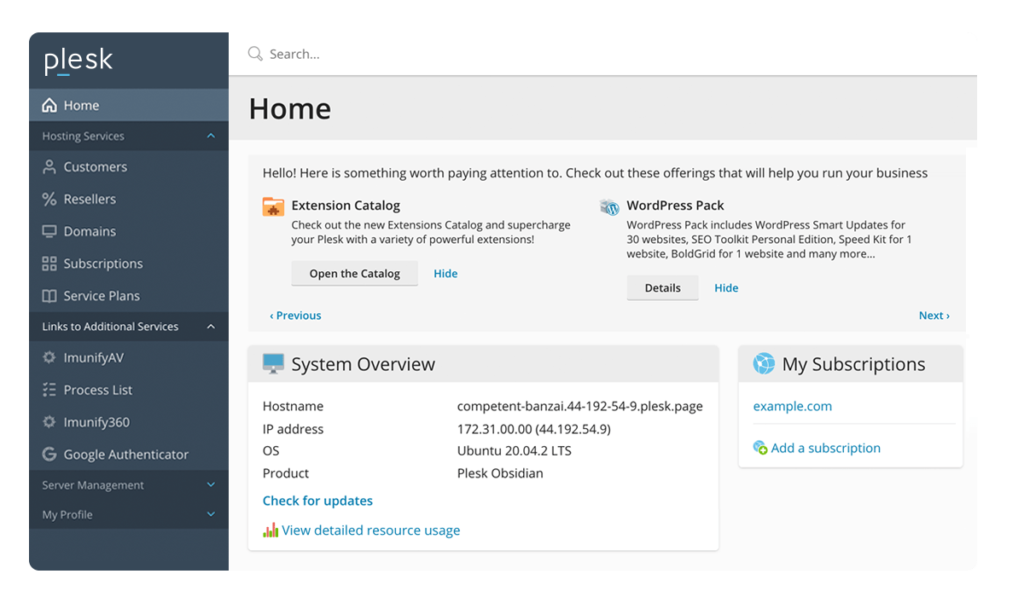
Plesk functions as an abstraction layer that simplifies complex server operations through an intuitive web interface. When you execute tasks through Plesk—such as creating websites, configuring email, or managing databases—the platform translates these actions into appropriate system commands for the underlying operating system.
Access Plesk through your web browser using:
https://yourdomain.com:8443
https://yourserverip:8443
Key Features of Plesk
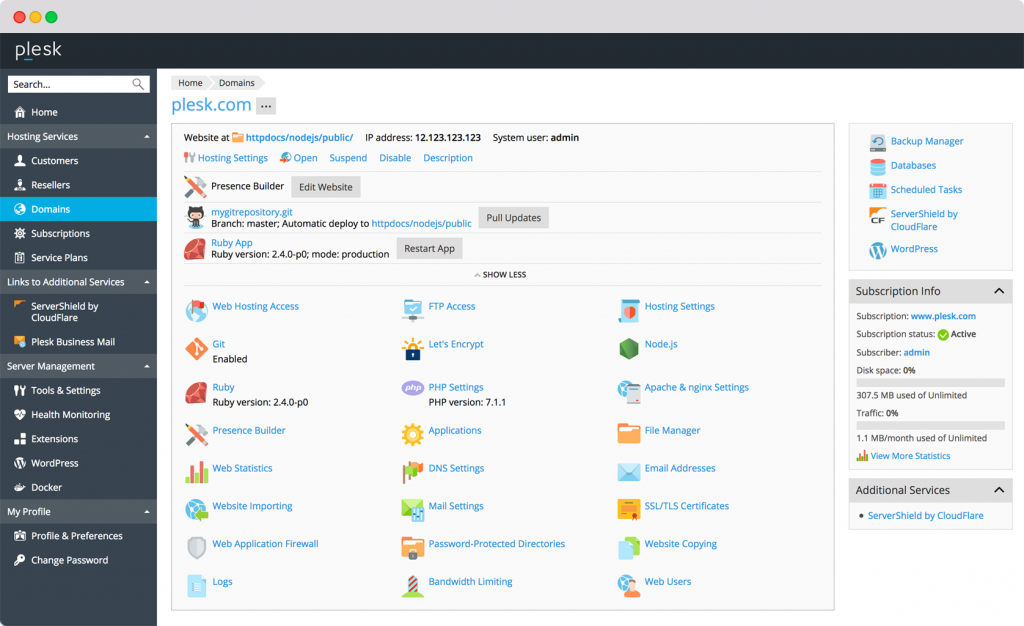
Plesk provides comprehensive functionality that addresses the needs of hosting providers, developers, and website owners alike.
1. Multi-Platform Support
- Linux Support – Full compatibility with CentOS, Ubuntu, Debian, AlmaLinux, Rocky Linux, and CloudLinux
- Windows Support – Native integration with Windows Server 2016, 2019, and 2022
- Unified Interface – Consistent experience across operating systems with platform-specific optimizations
2. WordPress Management
- WordPress Toolkit – Specialized interface for managing WordPress installations (included in all editions)
- Smart Updates – Automated WordPress core, plugin, and theme updates with rollback capability
- Security Scanning – Vulnerability detection and automated patching for WordPress sites
- Staging Environments – One-click creation of development copies for testing changes
- Cloning – Duplicate WordPress sites with complete data migration
3. Developer Tools
- Git Integration – Deploy websites directly from Git repositories with automatic updates
- Docker Support – Create and manage Docker containers through the Plesk interface
- Node.js Manager – Install and configure Node.js applications with version control
- PHP Management – Switch between multiple PHP versions per domain with custom configurations
- Composer Support – Dependency management for PHP applications
- WP-CLI Integration – Command-line WordPress management directly from Plesk
4. Security Features
- Security Advisor – Automated security audits with actionable recommendations
- ImunifyAV – Free malware scanner included in all editions
- Fail2Ban – Intrusion prevention system that blocks malicious IP addresses
- ModSecurity – Web application firewall for Apache and nginx
- SSL/TLS Certificates – Free Let’s Encrypt integration with automatic renewal
- Two-Factor Authentication – Enhanced login security for Plesk accounts
5. Email Management
- Email Accounts – Create unlimited mailboxes with webmail access
- Multiple Webmail Clients – Choose between Roundcube, Horde, or third-party solutions
- Anti-Spam Protection – SpamAssassin integration with customizable rules
- Mail Server Options – Support for Postfix, qmail (Linux) and MailEnable (Windows)
- Office 365 Integration – Direct integration for Microsoft 365 email services
6. Database Management
- MySQL/MariaDB – Full database management with phpMyAdmin
- PostgreSQL – Support for PostgreSQL databases with phpPgAdmin
- Microsoft SQL Server – Native MSSQL support on Windows servers
- Remote Access – Configure external database connections for applications
7. Backup and Migration
- Scheduled Backups – Automated backup creation with flexible retention policies
- Incremental Backups – Save storage space with differential backup technology
- Remote Storage – Store backups on FTP, Amazon S3, Google Drive, Dropbox, or OneDrive
- Plesk Migrator – Migrate websites from cPanel, DirectAdmin, and other platforms
Plesk Editions and Pricing
Plesk offers multiple editions designed for different use cases, with transparent pricing based on features rather than account limits.
Available Editions
| Edition | Domain Limit | Best For | Key Features |
|---|---|---|---|
| Web Admin | 10 domains | Personal websites | Basic hosting features |
| Web Pro | 30 domains | Web professionals | WordPress Toolkit, Git, Docker |
| Web Host | Unlimited | Hosting providers | Reseller management, white-label |
Pricing Structure
Plesk uses a feature-based pricing model rather than account-based limits:
- Web Admin Edition – Starting at $10-15/month
- Web Pro Edition – Starting at $20-30/month
- Web Host Edition – Starting at $35-50/month
Extensions Marketplace
Plesk’s extensibility is enhanced through its Extensions catalog, offering both free and premium add-ons:
- Monitoring Tools – Server health tracking and performance analytics
- Security Extensions – Advanced firewall rules and malware protection
- Development Tools – Additional language support and frameworks
- Backup Solutions – Enhanced backup capabilities and storage integrations
Plesk vs cPanel: Key Differences
While both platforms dominate the control panel market, they serve different needs and philosophies.
Platform Support
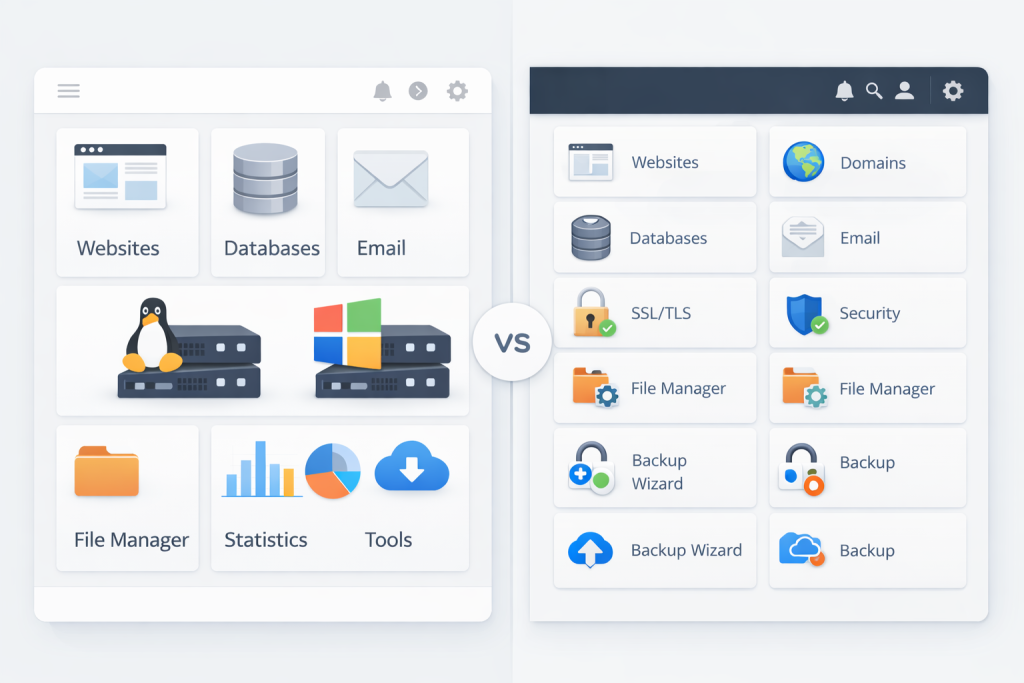
Plesk: Supports both Linux and Windows servers natively
cPanel: Linux-only platform
This fundamental difference makes Plesk the only viable option for Windows hosting environments or mixed infrastructure.
Interface Design
Plesk: Modern, card-based interface with responsive design
cPanel: Traditional icon-based layout with recent modernization efforts
Plesk’s interface feels more contemporary and adapts better to mobile devices.
WordPress Management
Plesk: WordPress Toolkit included in all editions
cPanel: Basic Softaculous installer; WordPress Toolkit costs extra
Plesk provides superior WordPress management capabilities out of the box.
Developer Features
Plesk: Native Git, Docker, and Node.js support
cPanel: Limited developer tools; requires third-party solutions
Plesk appeals more to developers requiring modern workflows.
Pricing Model
Plesk: Feature-based licensing (domain limits)
cPanel: Account-based licensing (number of hosting accounts)
Plesk’s model is more predictable for hosting providers managing multiple domains per client.
Market Presence
Plesk: Popular in Europe and growing globally; approximately 11 million websites
cPanel: Dominant in North America; approximately 70 million websites
cPanel maintains larger market share, but Plesk is gaining ground, particularly in markets prioritizing Windows support.
Who Should Use Plesk?
Plesk is ideally suited for:
- Windows Server Administrators – The only major control panel with native Windows support
- WordPress Developers – Superior WordPress management tools included by default
- Agencies Managing Client Sites – Excellent multi-site management with staging capabilities
- Developers – Modern toolchain including Git, Docker, and multiple language support
- European Hosting Providers – Strong presence and support in European markets
- Organizations Requiring Cross-Platform Management – Unified interface for mixed Linux/Windows infrastructure
However, Plesk may not be the best choice if you:
- Require the extensive third-party ecosystem that cPanel offers
- Prefer traditional control panel interfaces and workflows
- Need maximum compatibility with legacy hosting configurations
- Are locked into cPanel-specific tools and integrations
Getting Started with Plesk
Most hosting providers offering Plesk include detailed setup instructions. Here’s what to expect:
Read more: How to Install Plesk Panel on a Linux Server
Step 1 – Access Your Plesk Panel
Your hosting provider will supply login credentials after provisioning. Access Plesk via:
https://yourdomain.com:8443
https://yourserverip:8443
Step 2 – Complete Initial Configuration
First-time login triggers the Setup Wizard:
- Configure administrator password
- Set server hostname and contact email
- Choose default PHP version
- Configure automatic updates preferences
Step 3 – Create Your First Website
From the main dashboard:
- Click “Add Domain” or “Add Website”
- Enter domain name and select hosting type
- Configure PHP version and document root
- Enable SSL certificate (Let’s Encrypt recommended)
Step 4 – Install WordPress (Optional)
Using WordPress Toolkit:
- Navigate to WordPress section in sidebar
- Click “Install” button
- Configure site title, admin credentials, and plugins
- Complete installation in under 60 seconds
Step 5 – Configure Email
Set up professional email addresses:
- Navigate to “Mail” section
- Create email accounts for your domain
- Configure spam filter settings
- Set up email client (webmail or IMAP/SMTP)
Unique Advantages of Plesk
Cross-Platform Flexibility
Organizations running mixed infrastructure benefit from unified management. A single control panel interface manages both Linux and Windows servers, reducing training requirements and operational complexity.
Superior WordPress Management
WordPress Toolkit provides features that compete with dedicated WordPress management platforms, including smart updates with automated rollback, security scanning, staging environments, and SEO optimization tools.
Modern Development Workflow
Developers appreciate Plesk’s integration with contemporary tools. Git deployment enables continuous integration workflows, Docker support containerizes applications, and Node.js management facilitates modern web applications.
Security-First Architecture
Built-in security features reduce vulnerability exposure. Security Advisor continuously monitors server configuration, ImunifyAV scans for malware, and automated patching addresses known vulnerabilities.
Extension Ecosystem
The Plesk Extensions catalog provides specialized functionality without bloating the core platform. Extensions integrate seamlessly and receive updates independently from the main Plesk installation.
Best Practices for Plesk Management
- Enable Automatic Updates – Configure Plesk to install security patches automatically during low-traffic periods
- Configure Backup Schedules – Set up automated backups with remote storage to prevent data loss
- Use WordPress Toolkit – Leverage smart updates and security scanning for all WordPress installations
- Implement Two-Factor Authentication – Protect Plesk access with 2FA for all administrator accounts
- Review Security Advisor Recommendations – Regularly check and implement security suggestions
- Monitor Resource Usage – Use built-in monitoring tools to track CPU, memory, and disk usage
- Utilize Staging Environments – Test website changes in staging before deploying to production
- Keep Extensions Updated – Regularly update installed extensions to maintain security and functionality
- Configure Fail2Ban – Enable intrusion prevention to automatically block malicious access attempts
- Use SSL/TLS Everywhere – Install Let’s Encrypt certificates on all domains and enable HTTPS redirection
Common Plesk Use Cases
Windows Hosting
Organizations requiring ASP.NET applications, MSSQL databases, or Windows-specific software have no alternative to Plesk among major control panels. The platform provides native Windows Server integration impossible with Linux-only competitors.
Agency Management
Web development agencies managing multiple client websites benefit from Plesk’s domain-based licensing and WordPress Toolkit. Creating staging environments, cloning sites, and managing updates across dozens of WordPress installations becomes manageable.
Developer Environments
Developers appreciate Plesk’s Git integration, which enables pushing code from local development environments directly to production servers. Docker support containerizes applications for consistent deployment across environments.
WordPress-Focused Hosting
Hosting providers specializing in WordPress can leverage WordPress Toolkit to offer managed WordPress features without developing proprietary solutions. Smart updates, security scanning, and staging environments differentiate their offerings.
Migrating to Plesk
Switching control panels represents a significant undertaking, but Plesk provides tools to simplify the process.
Plesk Migrator
The official migration tool supports transfers from:
- cPanel/WHM
- DirectAdmin
- Confixx
- Other Plesk servers
Migration Process
- Install Plesk on destination server
- Access Plesk Migrator extension
- Enter source server credentials
- Select websites and data to migrate
- Initiate migration and monitor progress
- Verify migrated content and DNS records
- Update DNS to point to new server
Plesk Alternatives
While Plesk excels in cross-platform management, alternatives exist for specific use cases:
cPanel/WHM
The industry standard for Linux hosting with the largest market share and ecosystem. Choose cPanel if you require maximum third-party compatibility or operate exclusively on Linux.
DirectAdmin
A lightweight and cost-effective alternative with simpler licensing and lower resource usage.
Read more: What is DirectAdmin?
Enhance
A modern control panel designed for cloud-style hosting, offering scalable multi-server architecture and a clean user experience.
Read more: What is Enhance Panel?
CyberPanel
An open-source panel built on OpenLiteSpeed, often chosen for performance-focused WordPress hosting.
Read more: What is CyberPanel?
Webmin / Virtualmin
Highly flexible open-source management tools suited for admins who want granular control.
Read more: What is Webmin / Virtualmin?
Conclusion
Plesk has established itself as the premier cross-platform hosting control panel by delivering a modern interface, powerful automation tools, and unmatched Windows Server support. Its focus on contemporary development workflows, integrated security features, and superior WordPress management capabilities make it an excellent choice for hosting providers, agencies, and developers.
While cPanel maintains dominance in the Linux-only hosting market, Plesk’s unique capabilities—particularly Windows compatibility and included WordPress Toolkit—position it as the preferred solution for organizations requiring flexibility across operating systems or advanced WordPress management.
Whether you’re migrating from another control panel, setting up your first VPS, or managing hosting infrastructure for clients, Plesk provides the tools necessary to maintain secure, efficient, and modern web hosting environments. By following the best practices outlined in this guide and leveraging Plesk’s extensive feature set, you can deliver reliable hosting services that meet the demands of today’s web applications.